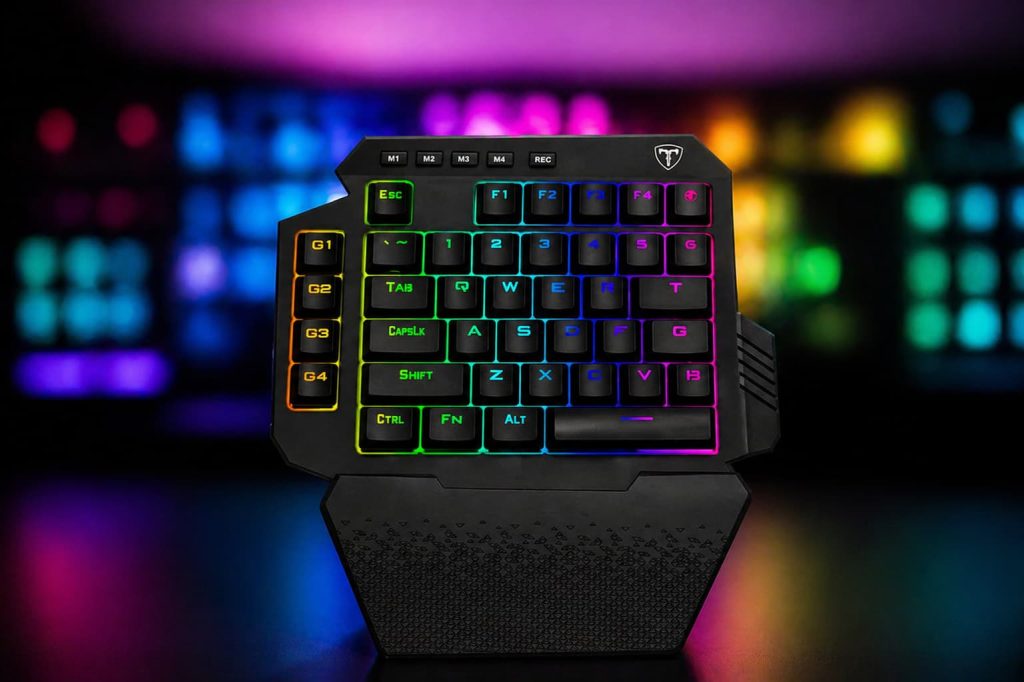
At first, a one-handed gaming keyboard can seem like a strange accessory. Many people expect a keyboard to include a full layout with letters, numbers, arrows, and function keys. A gaming keypad removes most of that and keeps only the controls commonly used while playing.
These devices are built around efficiency rather than typing. Instead of stretching your hand across a full keyboard, everything stays within a smaller area. For some players, this creates a more comfortable setup and can make fast reactions feel easier.
One-handed gaming keyboards are often used by people who spend a lot of time in shooters, MMORPGs, MOBAs, or action-heavy games where quick access to commands matters. They are not intended to replace a traditional keyboard completely, but they can become a useful secondary device for gaming.
This guide breaks down how one-handed gaming keyboards work, what makes them different from standard keyboards, and how to decide whether they fit your setup.
What Is a One-Handed Gaming Keyboard?
A one-handed gaming keyboard is a compact gaming input device that contains only the keys required for gameplay. It usually includes around 20 to 40 keys arranged in a smaller, ergonomic layout.
Unlike a normal keyboard, which includes letters, numbers, function keys, navigation keys, and a number pad, a one-handed keyboard focuses on essential gaming commands.
Most models include:
- Movement keys such as WASD
- Number keys for skills or weapon switching
- Modifier keys like Shift, Ctrl, and Alt
- Programmable macro keys
- Thumb controls or mini joysticks on certain models
- Wrist support for comfort
- RGB lighting customization
Many one-handed keyboards are built with gaming in mind, meaning they prioritize quick access and reduced hand movement.
How a One-Handed Gaming Keyboard Works
A one-handed gaming keyboard works similarly to a standard keyboard but with a simplified layout. It connects to a computer through USB or wireless connectivity and acts as an input device.
Once plugged in, the computer recognizes it like a regular keyboard. The difference lies in how the keys are arranged and customized.
Instead of reaching across an entire keyboard, players can keep their fingers within a small range of movement. This allows for faster access to important actions.
For example:
- The index finger may handle movement keys
- The thumb may activate a joystick or side button
- The ring and middle fingers may control skills or hotkeys
- Extra macro buttons may trigger multiple actions
Some devices include companion software that allows users to remap keys, assign macros, and create custom profiles for different games.
This means the same keyboard can behave differently depending on the title being played.
One-Handed Keyboard vs Regular Keyboard
The biggest difference between a one-handed keyboard and a regular keyboard is purpose.
A normal keyboard is designed for general use. It handles typing, browsing, office work, communication, and gaming. A one-handed gaming keyboard is specialized. It removes unnecessary keys and focuses only on gameplay efficiency.
Size and Layout
A standard keyboard may contain between 87 and 104 keys depending on its size. A one-handed keyboard usually contains far fewer keys. The layout is condensed so that every important action sits within easy finger reach.
This smaller size also frees up desk space, which can be useful for gamers who prefer low mouse sensitivity and wide arm movements.
Ergonomics
Traditional keyboards are flat and symmetrical. While comfortable for typing, they are not always optimized for long gaming sessions.
One-handed keyboards often feature angled key layouts and wrist rests. This creates a more natural hand position and may reduce strain during extended play.
Portability
A regular keyboard is larger and less convenient to transport. A one-handed gaming keyboard is compact, making it easier to pack for LAN parties, tournaments, or travel.
Customization
Most gaming keypads offer heavy customization.
Users can:
- Rebind keys
- Create game-specific profiles
- Record macros
- Adjust lighting
- Save multiple layouts
While some full-size gaming keyboards offer customization too, one-handed devices often focus more heavily on gameplay-specific control.
Typing Capability
A normal keyboard remains essential for typing. One-handed gaming keyboards are not practical for writing emails, documents, or chatting extensively. They are built almost entirely for gameplay.
Why Gamers Use One-Handed Keyboards
Many gamers switch to one-handed keyboards because they provide a more controlled experience. A full keyboard contains many unused keys during gaming. In competitive situations, players often rely on only a small section of the keyboard. A gaming keypad places those essential controls in a tighter, more ergonomic arrangement.
Faster Access to Commands
When keys are closer together, fingers travel less distance. This can help players react more quickly during fast gameplay.
More Mouse Space
One-handed keyboards take up less room on a desk. This allows gamers to position their mouse farther away without feeling cramped.
Better Comfort During Long Sessions
Many gaming keypads are shaped around hand positioning. The added wrist support and angled layout can make long sessions more comfortable.
Easier Macro Access
Players who use complex commands may benefit from programmable macro buttons. These are especially useful in games where repeated actions occur frequently.
Types of One-Handed Gaming Keyboards
Not all one-handed gaming keyboards are the same. Different models target different gaming styles.
Traditional Keypad Style
These resemble a partial keyboard. They include rows of mechanical or membrane keys arranged in a gaming-focused layout. Examples include popular keypad devices that mimic the left side of a full keyboard.
Thumbstick Gaming Keypads
Some devices include an analog thumbstick. This allows players to move using a joystick rather than relying entirely on WASD movement. These are popular in games that benefit from analog directional input.
Mechanical One-Handed Keyboards
Mechanical versions use physical switches under each key.
They often provide:
- Faster response time
- Better tactile feedback
- Greater durability
- Stronger key consistency
Mechanical switches are popular among competitive players because of their precision.
Membrane One-Handed Keyboards
Membrane models use softer key mechanisms.
These are usually:
- More affordable
- Quieter
- Lighter
- Easier for casual players
They may not feel as precise as mechanical models but still perform well for many users.
How to Set Up a One-Handed Gaming Keyboard
Setting up a one-handed keyboard is generally simple.
Step 1: Connect the Device
Plug the keyboard into a USB port or connect wirelessly if supported. Most devices are recognized automatically by Windows or other operating systems.
Step 2: Install Software
Many gaming keypads come with companion software. Installing this software allows access to advanced settings.
Users can:
- Remap keys
- Assign macros
- Create profiles
- Adjust lighting
- Save presets
Step 3: Choose a Comfortable Position
Place the keyboard at a comfortable angle. Unlike standard keyboards, these devices are often rotated slightly to match natural wrist alignment.
Step 4: Customize Key Bindings
Different games require different controls.
For example:
- FPS games may prioritize movement, crouch, reload, and weapon switching
- MMO games may require quick access to dozens of abilities
- Strategy games may benefit from grouped commands
Adjust the layout based on personal comfort.
Step 5: Practice Finger Placement
Moving from a full keyboard to a gaming keypad requires muscle memory. Spend time learning the layout before using it competitively.
Common Key Layout for Gaming
While layouts vary, many players use similar configurations.
A common setup might include:
- WASD for movement
- Space for jump
- Shift for sprint
- Ctrl for crouch
- Q and E for abilities or leaning
- R for reload
- Number keys for weapons or skills
Many one-handed keyboards place these keys closer together than on a normal keyboard. This minimizes unnecessary hand movement.
Advantages of One-Handed Gaming Keyboards
One-handed gaming keyboards appeal to players because they simplify the experience and remove distractions. Since only the most important gaming keys are included, the hand stays in a smaller movement zone, which can feel more natural during long sessions. The ergonomic shape often improves wrist comfort compared to a flat traditional keyboard. Their compact design also creates more room for mouse movement, something many competitive players appreciate. Another benefit is customization. Many models allow users to save different layouts, profiles, and macros depending on the game being played. Their smaller size also makes them easier to transport compared to carrying a full keyboard.
Disadvantages of One-Handed Gaming Keyboards
Despite the benefits, one-handed gaming keyboards are not perfect for everyone. They are designed almost entirely for gaming, meaning they are not useful for typing long documents, browsing, or general computer work. Most users still need a regular keyboard nearby for everyday tasks. There is also an adjustment period, especially for players who have spent years using a standard layout. At first, muscle memory may feel disrupted, and some keys may seem harder to reach until the hand adapts. Price can also be a factor, since buying a gaming keypad is usually an additional purchase rather than a replacement for an existing keyboard.
Are One-Handed Gaming Keyboards Worth It?
Whether a one-handed gaming keyboard is worth buying depends on gaming habits. Players who spend many hours in competitive games may appreciate the comfort and layout advantages.
Those who mostly play casually or use a keyboard for both gaming and work may find a full-size keyboard sufficient. For dedicated gamers, however, a one-handed keypad can become a specialized tool that enhances precision and comfort.
Tips for Choosing the Right One-Handed Keyboard
Choosing the right one-handed keyboard depends on personal preference and gaming style. Mechanical switches are often preferred by competitive players because they offer stronger tactile feedback and a more responsive feel. Membrane switches, on the other hand, tend to be quieter and more affordable. Build quality matters as well, especially for players who spend many hours gaming each week. A solid frame and reliable keys usually last longer under heavy use. Wrist support can make a major difference in comfort during extended sessions, while software customization allows users to remap controls and save game-specific profiles. Some models also include thumbsticks or extra buttons that provide additional control options. Deciding between wired and wireless models is another important consideration, as wired devices may offer lower latency while wireless options provide a cleaner desk setup.
Final Thoughts
A one-handed gaming keyboard is a specialized gaming tool designed to simplify input and improve comfort. Unlike traditional keyboards, it focuses only on gameplay essentials. This creates a more compact layout, frees desk space, and reduces unnecessary finger movement.
While it cannot replace a normal keyboard for typing and daily tasks, it may become a valuable addition for gamers who want a more focused setup.
Understanding how these devices work, how they differ from regular keyboards, and how to configure them properly helps players decide whether they fit their gaming style. For competitive users, comfort, speed, and accessibility often matter just as much as raw performance. A well-configured one-handed gaming keyboard can contribute to all three.

I’m Alex Mercer, a senior gaming and esports writer at GamingImba. I’ve been involved in gaming for as long as I can remember, and for more than a decade I’ve been writing about competitive play, industry trends, and the culture that grows around games.
My work focuses on esports, online gaming platforms, and how technology continues to shape the way people play, compete, and connect. I’m especially interested in meta shifts, balance changes, and the business decisions that influence modern games behind the scenes.
At GamingImba, I aim to break down complex topics in a way that’s clear, honest, and useful—whether that means analyzing a major tournament, exploring new gaming platforms, or looking at how player behavior evolves over time.
I follow global esports scenes closely, experiment with different games and mods in my free time, and enjoy digging into the details that most players notice but rarely stop to question.