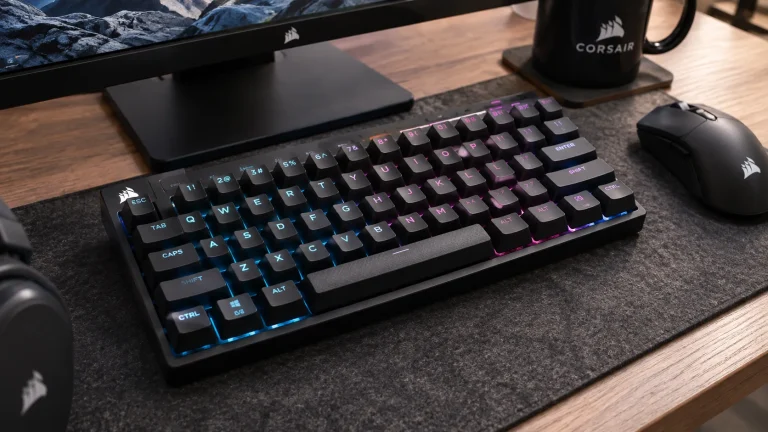
A full-size keyboard can take up a surprising amount of desk space, especially once you add a monitor, speakers, and a decent-sized mouse pad. Things get even more frustrating if you play games with low mouse sensitivity and constantly find yourself hitting the side of your keyboard.
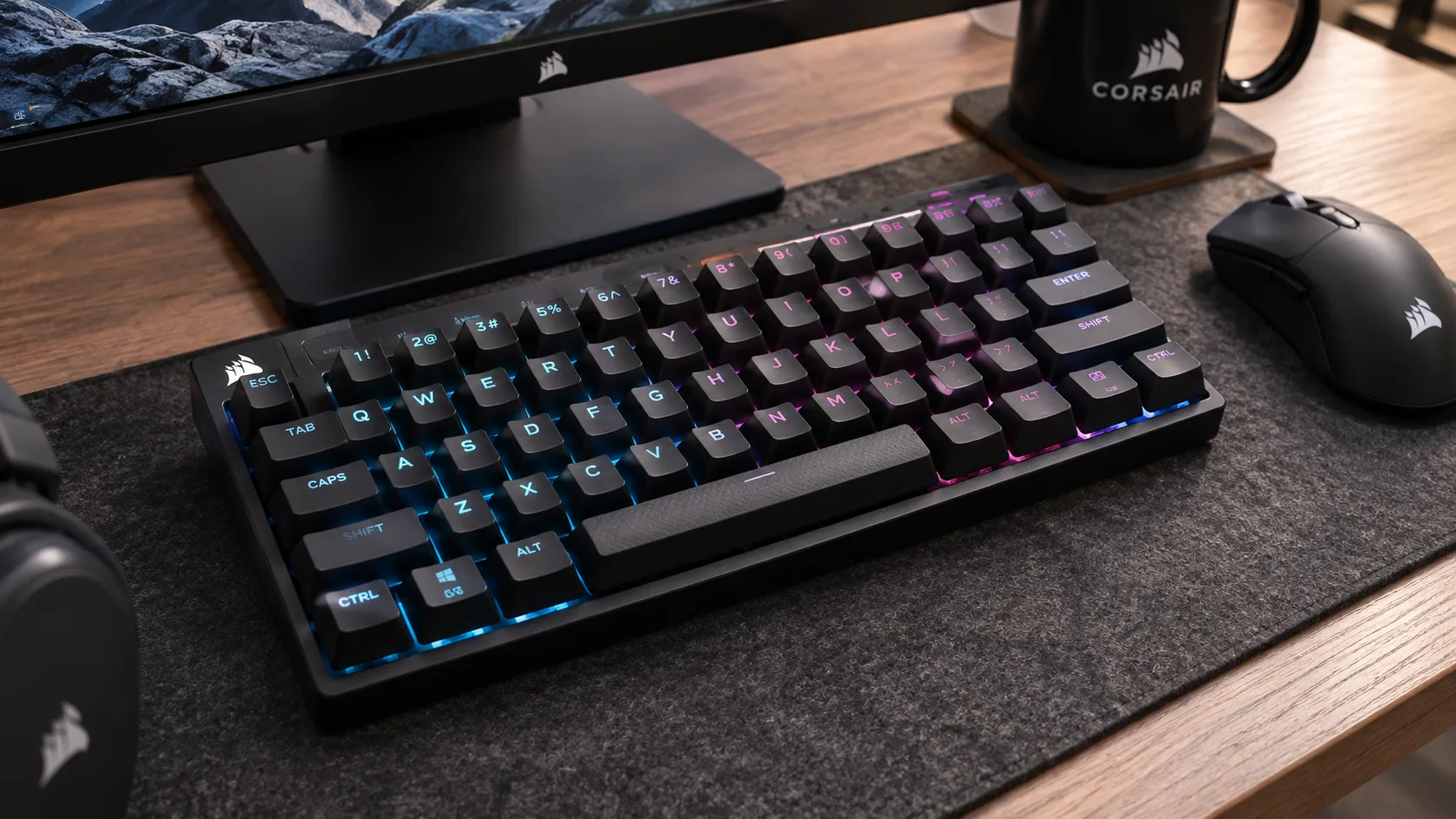
Switching to a mini keyboard can make a noticeable difference, but going as small as possible isn’t always the best decision. Losing dedicated arrow keys or the function row might not bother you during a game of Counter-Strike 2, but it can quickly become annoying when working or playing something more complex.
I’ve picked five compact keyboards that approach this problem differently. Some prioritize gaming performance, while others offer a more practical balance between everyday use and desk space.
Best Keyboards for Small Desks Compared
The following keyboards cover four different layouts, from ultra-compact 60% models to more traditional tenkeyless designs.
| Keyboard | Layout | Width | RGB | Hot-swappable | Software |
| Royal Kludge RK61 | 60% | ~29 cm | Optional | Version-dependent | RK Software* |
| ASUS ROG Falchion RX | 65% | 30.6 cm | Per-key | No | Armoury Crate |
| Keychron K3 Max | 75% | 30.6 cm | Optional | Optional | QMK / Launcher |
| Corsair K65 Plus Wireless | 75% | 32 cm | Per-key | Yes | iCUE |
| Logitech G515 LIGHTSPEED | TKL | 36.8 cm | Per-key | No | G HUB |
Recommendations are based on published specifications, physical dimensions, layout, connectivity, and suitability for different setups rather than hands-on testing.
1. Royal Kludge RK61 – Best Budget Mini Keyboard
The Royal Kludge RK61 is a good starting point for anyone looking to free up desk space without spending too much on new peripherals. Its 61-key layout measures approximately 11.4 inches (29 cm) across, leaving considerably more room for mouse movement than a conventional full-size keyboard.
Despite its budget positioning, the RK61 offers mechanical switches rather than the membrane switches commonly found on inexpensive keyboards. Depending on the version, you can choose between red linear, brown tactile, and blue clicky switches. I’d lean toward red switches for gaming, particularly if the keyboard will be used in a shared room where loud keystrokes could become annoying.
The keyboard is available in black and white, with different lighting and connectivity options. The standard single-color model features adjustable backlighting, while other RK61 versions offer RGB lighting, 2.4 GHz wireless connectivity, and additional customization options. Hot-swappable versions also allow you to replace switches without soldering.
Bluetooth connectivity lets you pair the keyboard with up to three devices, making it useful if you regularly switch between a desktop, laptop, or tablet. For competitive gaming, however, I’d use the wired connection or choose a version with a dedicated 2.4 GHz receiver.
The biggest limitation is the 60% layout itself. There are no dedicated arrow keys, function keys, or number pad, so you’ll need to become familiar with the keyboard’s secondary functions.
Key specifications:
- Layout: 60%, 61 keys
- Dimensions: Approximately 29 × 10.2 × 3.8 cm
- Switches: Red, brown, or blue mechanical switches, depending on configuration
- Backlighting: Single-color or RGB, depending on version
- Connectivity: USB-C, Bluetooth, and optional 2.4 GHz wireless
- Hot-swappable switches: Available on compatible versions
- Multi-device connectivity: Up to three Bluetooth devices
- Dedicated arrow keys: No
- Dedicated function row: No
What I like: Its affordable price, compact footprint, and mechanical switches make it an attractive entry point into smaller keyboards.
What I would consider before buying: There are several RK61 revisions with different features. Check the exact configuration rather than assuming every RK61 includes RGB lighting, hot-swappable switches, and 2.4 GHz connectivity.
2. ASUS ROG Falchion RX Low Profile – Best Compact Gaming Keyboard
The ASUS ROG Falchion RX Low Profile is a more premium approach to compact gaming keyboards. Its 65% layout fits dedicated arrow keys into a body measuring just 12 inches (30.6 cm) across, making it only slightly wider than many 60% models.
Instead of conventional mechanical switches, ASUS uses its ROG RX low-profile optical switches. These register keystrokes using light rather than traditional electrical contacts and are available in linear red and clicky blue versions. The red switches have a 1 mm actuation point, which may appeal to players who prefer light, responsive inputs.
The keyboard features individually illuminated RGB keys and supports ASUS Aura Sync, allowing you to coordinate lighting effects with other compatible peripherals. Integrated silicone dampening layers help reduce typing noise and unwanted vibrations, while the low-profile construction keeps the keyboard relatively slim.
One of its more unusual features is the interactive touch panel. Rather than dedicating additional space to multimedia buttons, ASUS lets you adjust volume, lighting brightness, and other supported functions through a compact touch-sensitive control.
Wireless connectivity includes Bluetooth and ASUS ROG SpeedNova 2.4 GHz technology. The included ROG Omni Receiver can connect compatible ASUS peripherals through a single USB receiver, which is useful if you’re already using a compatible ROG mouse.
ASUS also includes a protective cover that can be used when transporting the keyboard, making it a practical option for LAN events or portable gaming setups.
Key specifications:
- Layout: 65%
- Dimensions: 30.6 × 11 × 2.65 cm
- Switches: ROG RX low-profile optical red or blue
- Backlighting: Per-key RGB with Aura Sync
- Connectivity: 2.4 GHz wireless, Bluetooth 5.1, USB
- Polling rate: 1,000 Hz over USB
- Software: Armoury Crate
- Additional controls: Interactive touch panel
- Sound dampening: Integrated silicone layers
- Dedicated arrow keys: Yes
- Dedicated function row: No
What I like: ASUS manages to include dedicated arrows, multimedia controls, RGB lighting, and several wireless options without making the keyboard unnecessarily large.
What I would consider before buying: The proprietary optical switches limit customization compared with traditional hot-swappable mechanical keyboards. It’s also a premium product, so some of its features may be unnecessary for casual players.
3. Keychron K3 Max – Best Compact Keyboard for Gaming and Work
The Keychron K3 Max is a particularly interesting option because it offers a 75% layout while occupying exactly the same horizontal desk space as the smaller 65% ASUS Falchion RX Low Profile. At 12 inches (30.6 cm) wide, it retains both the function row and dedicated arrow keys without taking up much room.
Its low-profile Gateron mechanical switches are available in red, brown, and blue configurations, offering different combinations of resistance, tactile feedback, and typing noise. The keyboard also features double-shot PBT keycaps, which generally resist surface wear and shine better than conventional ABS keycaps.
Unlike many gaming keyboards that rely on proprietary desktop software, the K3 Max supports QMK firmware. Through Keychron Launcher, users can customize key assignments, create macros, and configure different keyboard layers. This is particularly useful if you want different shortcuts for gaming and productivity.
The RGB version offers individually customizable lighting, while a white-backlit version is also available for people who prefer a simpler appearance. Hot-swappable configurations let you replace compatible low-profile mechanical switches, although they are not compatible with every switch available on the market.
The K3 Max has a 1,550 mAh rechargeable battery. Keychron advertises up to 73 hours of wireless use with the backlight disabled and up to 40 hours with RGB lighting at its lowest brightness.
Its 2.4 GHz wireless and wired modes support a 1,000 Hz polling rate, while Bluetooth is available for connecting to multiple devices. There’s also support for both Windows and macOS, making it a convenient choice for mixed-device setups.
Key specifications:
- Layout: 75%
- Dimensions: 30.6 × 11.6 cm
- Switches: Low-profile Gateron mechanical
- Keycaps: Double-shot PBT
- Backlighting: White or RGB
- Battery: 1,550 mAh
- Battery life: Up to 78 hours without backlighting
- Connectivity: 2.4 GHz wireless, Bluetooth 5.1, USB-C
- Polling rate: 1,000 Hz over wired and 2.4 GHz connections
- Customization: QMK and Keychron Launcher
- Hot-swappable switches: Available on selected configurations
- Dedicated arrow keys: Yes
- Dedicated function row: Yes
What I like: If I needed one keyboard for a small desk where I work during the day and play games in the evening, this would probably be my first choice. It doesn’t force you to sacrifice useful keys just to save space.
What I would consider before buying: The low-profile design offers a different typing experience from traditional mechanical keyboards, and its switch compatibility is more restrictive.
4. Corsair K65 Plus Wireless – Best for Customization and RGB Lighting
The Corsair K65 Plus Wireless is a 75% mechanical gaming keyboard for people who want a smaller setup without giving up the features normally associated with larger premium keyboards.
It measures approximately 12.6 inches (32 cm) across, keeping the function row and arrow keys while removing the number pad and consolidating the navigation section. It isn’t quite as slim as the ASUS or Keychron models, but its conventional mechanical design offers more opportunities for customization.
The original version comes with pre-lubricated Corsair MLX Red linear switches. These switches have a 1.9 mm actuation point, a 45 g actuation force, and 4 mm of total travel, offering a more traditional mechanical typing experience than low-profile alternatives. The hot-swappable PCB also allows you to install compatible three-pin and five-pin mechanical switches without soldering.
Corsair uses dye-sublimated PBT keycaps and two layers of sound-dampening material to reduce unwanted noise from inside the keyboard. This can be particularly beneficial if your gaming setup is located in a bedroom or shared living space.
RGB lighting is individually customizable across the keyboard through Corsair iCUE. You can create lighting profiles, adjust effects, remap keys, and configure macros. Compatible Corsair devices can also share synchronized lighting effects, which is appealing if you already own other peripherals from the brand.
Another useful addition is the multifunction rotary dial. It provides quick access to supported adjustments such as volume and lighting brightness without requiring a separate set of multimedia buttons.
Corsair advertises up to 266 hours of battery life when using its 2.4 GHz wireless connection with RGB lighting switched off. Naturally, keeping the lighting enabled will reduce that figure.
The keyboard supports Bluetooth, 2.4 GHz wireless, and wired USB connectivity. It also includes full N-key rollover and anti-ghosting, allowing multiple simultaneous key presses to be registered correctly.
Key specifications:
- Layout: 75%
- Dimensions: 32 × 13.6 × 3.5 cm
- Switches: Pre-lubricated Corsair MLX Red linear mechanical
- Switch actuation: 1.9 mm
- Total switch travel: 4 mm
- Keycaps: Dye-sublimated PBT
- Backlighting: Individually customizable RGB
- Software: Corsair iCUE
- Connectivity: 2.4 GHz wireless, Bluetooth, USB
- Polling rate: Up to 1,000 Hz
- Battery life: Up to 266 hours with RGB disabled over 2.4 GHz
- Hot-swappable switches: Compatible three-pin and five-pin mechanical switches
- Additional controls: Multifunction rotary dial
- Sound dampening: Two internal layers
- Dedicated arrow keys: Yes
- Dedicated function row: Yes
What I like: The K65 Plus Wireless gives you plenty of room to personalize your keyboard over time. You can change its switches, customize lighting, and adjust key functions without having to replace the entire keyboard.
What I would consider before buying: Its thicker and deeper construction makes it less suitable for extremely shallow desks than some low-profile alternatives. If you also use a wrist rest, the overall footprint becomes larger. The original PBT keycaps also have non-translucent legends, so the RGB lighting does not illuminate the lettering itself.
5. Logitech G515 LIGHTSPEED TKL – Best for a Familiar Keyboard Layout
The Logitech G515 LIGHTSPEED TKL is worth considering if you want to reclaim some desk space without completely changing the way you use your keyboard. Its tenkeyless layout removes the number pad but retains the traditional function row, arrow keys, and navigation section.
At approximately 14.5 inches (36.8 cm) wide and only 22 mm tall, it occupies more horizontal space than the other keyboards on this list but maintains a slim typing profile.
Logitech offers low-profile GL mechanical switches in linear and tactile versions. Both feature a nominal 1.3 mm actuation distance and 3.2 mm total travel. The shorter travel may appeal to players who prefer quicker, shallower keystrokes rather than the deeper movement of conventional mechanical switches.
The keyboard uses double-shot PBT keycaps, factory-lubricated switches, and integrated sound-dampening construction. It also features per-key LIGHTSYNC RGB lighting, with approximately 16.8 million colors available through Logitech G HUB.
One of its more interesting software features is KEYCONTROL. Logitech allows users to assign multiple functions to individual keys, creating additional command layers without physically adding more buttons. This is useful for games that require numerous shortcuts or for people who use the same keyboard for work.
Connectivity includes Logitech’s LIGHTSPEED wireless technology, Bluetooth, and wired USB. Logitech advertises up to 36 hours of battery life, although actual battery performance depends on lighting settings and usage.
If you already use compatible Logitech gaming peripherals, G HUB provides a centralized place to configure lighting, assignments, and profiles across your setup.
Key specifications:
- Layout: Tenkeyless (TKL)
- Dimensions: Approximately 36.8 × 15 × 2.2 cm
- Switches: GL low-profile mechanical, linear or tactile
- Switch actuation: 1.3 mm
- Total switch travel: 3.2 mm
- Keycaps: Double-shot PBT
- Backlighting: Per-key LIGHTSYNC RGB
- Connectivity: LIGHTSPEED wireless, Bluetooth, USB
- Battery life: Up to 36 hours
- Software: Logitech G HUB
- Additional customization: KEYCONTROL
- Dedicated arrow keys: Yes
- Dedicated function row: Yes
What I like: You get many of the features of a modern wireless gaming keyboard without having to relearn basic shortcuts or rely heavily on secondary key combinations.
What I would consider before buying: It is considerably wider than a compact 75% keyboard, and its switches are not designed for easy hot-swapping. If maximizing mouse space is your main priority, the smaller models on this list make more sense.
How Much Desk Space Can a Mini Keyboard Save?
Keyboard layouts give you a general idea of size, but they don’t tell you exactly how much room a keyboard will occupy. Bezels, key spacing, and extra controls can make keyboards with the same layout noticeably different in size.
Using a 17.3-inch (44 cm) full-size keyboard as a reference, here’s how much horizontal desk space you could recover with each of the models above.
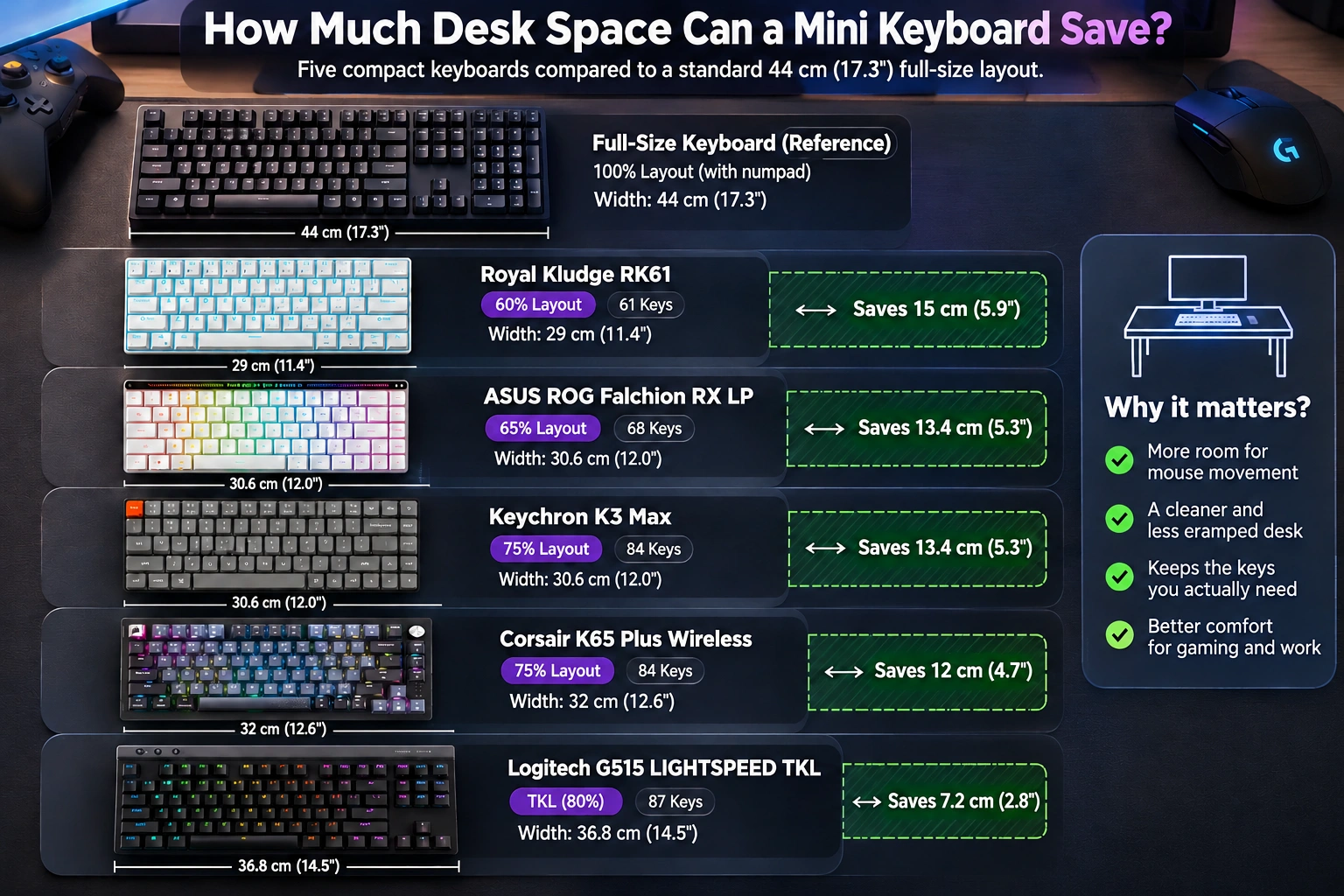
| Keyboard | Width | Additional desk space |
| Full-size reference keyboard | 17.3 in | – |
| Royal Kludge RK61 | 11.4 in | 5.9 in (15 cm) |
| ASUS ROG Falchion RX Low Profile | 12 in | 5.3 in (13.4 cm) |
| Keychron K3 Max | 12 in | 5.3 in (13.4 cm) |
| Corsair K65 Plus Wireless | 12.6 in | 4.7 in (12 cm) |
| Logitech G515 LIGHTSPEED TKL | 14.5 in | 2.8 in (7.2 cm) |
An extra five inches might not sound particularly impressive until you consider how much room your mouse needs during a large movement in an FPS game. On a narrow desk, that difference could allow you to use a wider mouse pad or stop keeping your keyboard at an uncomfortable angle.
Of course, these figures depend on the dimensions of your current keyboard. Measure it before assuming you’ll gain the exact amount of space shown in the table.
Which Keyboard Layout Is Best for a Small Desk?
Before choosing a specific model, think about which keys you actually use. There is little point in buying an ultra-compact keyboard if you spend the next few months missing half of its functions.
60% Keyboards
A 60% keyboard typically removes the number pad, function row, dedicated arrow keys, and most navigation keys. These functions remain accessible through secondary layers, but they require additional key combinations.
This layout is particularly attractive for FPS players and people with extremely limited desk space. However, it’s less convenient for spreadsheets, productivity shortcuts, and games that rely heavily on function keys.
65% Keyboards
A 65% keyboard brings back dedicated arrow keys and usually a few navigation keys without adding much width. It’s a practical compromise if you want a mini keyboard but don’t want to rely on shortcuts for basic navigation.
For a gaming-focused setup, this is one of the first layouts I’d consider.
75% Keyboards
A 75% keyboard retains the function row, arrow keys, and several navigation keys, usually arranged close to the main typing area. Some models are barely wider than a 65% keyboard, although they need more space from front to back.
If your computer doubles as a workstation, a 75% layout is often worth considering before going any smaller.
Tenkeyless (TKL) Keyboards
A TKL keyboard is essentially a traditional keyboard without the number pad. It keeps most of the familiar key spacing and navigation controls, making it easier to transition from a full-size model.
You won’t save quite as much space, but you also won’t need to change many of your existing typing or gaming habits.
What Keyboard Size Should You Choose for Your Desk?
The overall width of your desk matters, but so does how much of it is actually available. Speakers, monitor stands, desktop computers, microphones, and other accessories can quickly eat into the usable space.
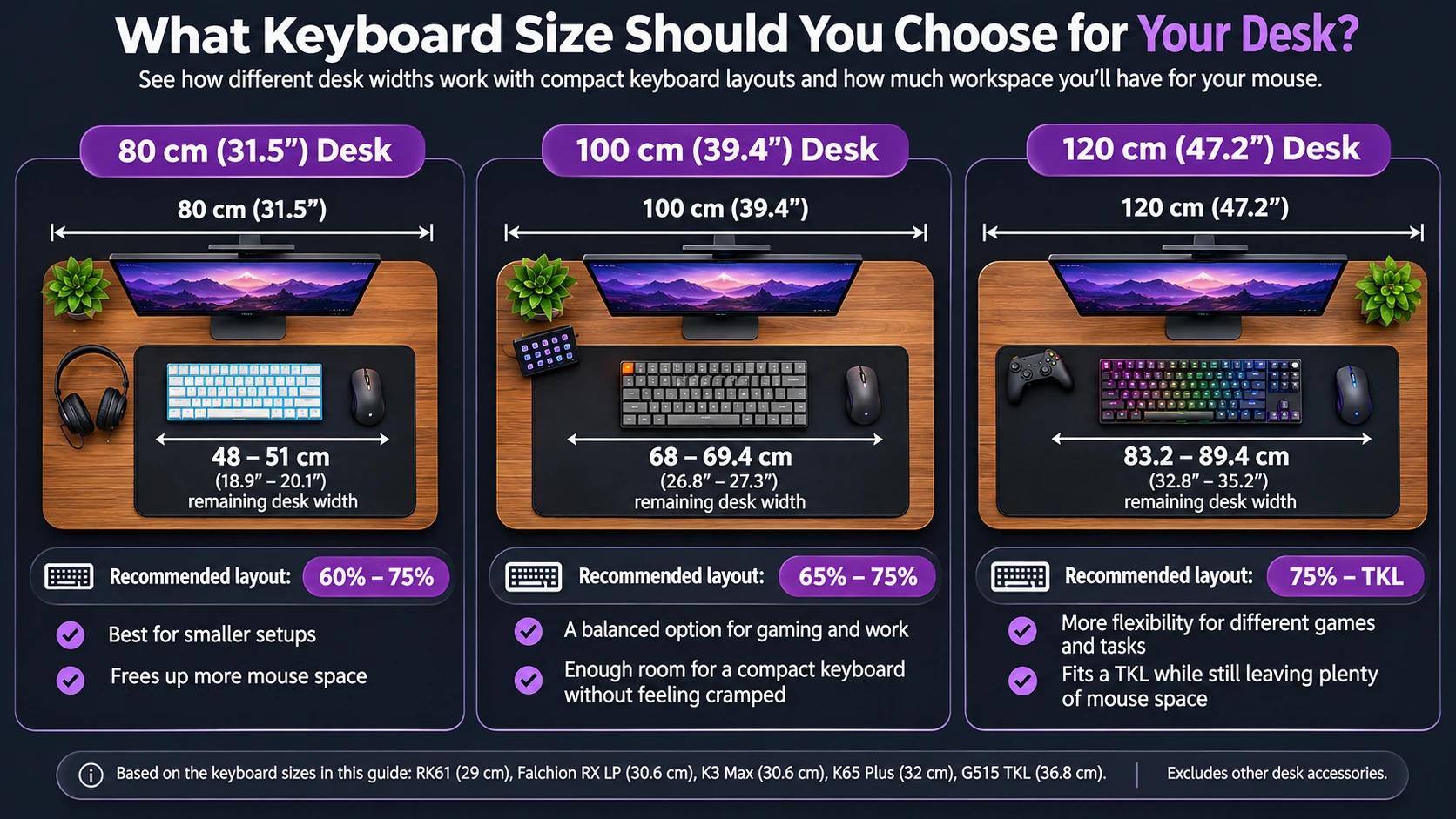
The following table illustrates how much horizontal space remains for your mouse and other items after placing different keyboards on an otherwise empty desk.
| Desk width | 60% RK61 | 75% Keychron K3 Max | TKL Logitech G515 | Full-size reference |
| 31.5 in (80 cm) | 51 cm | 49.4 cm | 43.2 cm | 36 cm |
| 39.4 in (100 cm) | 71 cm | 69.4 cm | 63.2 cm | 56 cm |
| 47.2 in (120 cm) | 91 cm | 89.4 cm | 83.2 cm | 76 cm |
These figures represent remaining horizontal desk width, not guaranteed mouse movement space. You’ll still need to account for other accessories, gaps between devices, and how your keyboard is positioned.
Desks Around 31.5 Inches (80 cm) or Smaller
For a genuinely small desk, I’d start with a 60%, 65%, or compact 75% keyboard. A large monitor stand combined with a full-size keyboard can leave very little flexibility for positioning your mouse comfortably.
The Royal Kludge RK61 and Keychron K3 Max are particularly interesting here because both occupy relatively little horizontal space despite their different layouts.
Desks Between 31.5 and 39.4 Inches (80-100 cm)
A 65% or 75% keyboard will suit many setups in this size range. You can retain useful dedicated keys while leaving space for a reasonably large mouse pad.
If you’re playing with low sensitivity, the extra mouse space provided by a smaller keyboard may still be worth prioritizing.
Desks Between 39.4 and 47.2 Inches (100-120 cm)
At this size, a TKL keyboard becomes a much more practical option. You might even be comfortable with a full-size keyboard, depending on your monitor stand and other accessories.
Unless you’re regularly making large mouse movements or trying to achieve a particularly minimal setup, there’s less reason to sacrifice useful keys just to save a few additional inches.
Are Mini Keyboards Actually Better for Gaming?
A smaller keyboard won’t automatically improve your reaction time or make you a better player. What it can do is remove some of the physical limitations of a cramped gaming setup.
The benefits also depend heavily on what you’re playing.
| Game type | Layout worth considering | Why |
| FPS – Counter-Strike 2, Valorant | 60% or 65% | More room for large mouse movements |
| MOBA – League of Legends, Dota 2 | 65% or 75% | Function keys can be useful |
| MMO – World of Warcraft | 75% or TKL | More dedicated keybindings |
| Strategy games | 75% or TKL | Convenient access to shortcuts |
| Casual and single-player games | Any compact layout | Personal comfort matters most |
For example, Dota 2 can be played perfectly well on a 60% keyboard, but if you use function keys for unit selection or other custom bindings, a 75% model may be more convenient.
Competitive FPS players may find the opposite. Having additional room for mouse movement can be more valuable than having dedicated keys they rarely touch during a match.
Also, don’t confuse keyboard size with gaming performance. Switch behavior, input latency, wireless implementation, and polling rate are separate factors. A compact keyboard isn’t inherently faster than a full-size one.
What to Consider Before Buying a Keyboard for a Small Desk
Measure the Actual Keyboard, Not Just Its Layout
The Keychron K3 Max and ASUS Falchion RX Low Profile are perfect examples of why layout percentages can be misleading. One has a 75% layout and the other has a 65% layout, yet both are 30.6 cm wide.
Check the physical dimensions of the exact model you’re considering. You might be able to retain more functionality without sacrificing any additional mouse space.
Don’t Forget About Desk Depth
Width usually receives all the attention, but depth matters just as much if your monitor sits close to you.
A slim keyboard combined with a shallow body can give you more flexibility when positioning your hands. Conversely, a thick mechanical keyboard with a separate wrist rest can occupy more usable surface area than you initially expect.
Choose the Right Wireless Connection
A wireless keyboard helps reduce cable clutter, but not all wireless connection modes are equally suited to gaming.
For competitive games, I’d generally favor a wired connection or a dedicated 2.4 GHz receiver over Bluetooth. Bluetooth remains convenient for everyday typing and switching between devices, but its latency characteristics can vary depending on the keyboard and connected hardware.
Consider the Keys You Use Outside of Gaming
It’s easy to focus entirely on gaming when shopping for a new keyboard. Spend a day paying attention to how often you use Delete, Home, End, the arrow keys, or the function row.
If you use these keys frequently, the novelty of having a tiny keyboard could wear off quite quickly.
Think About Switch Height and Comfort
Traditional mechanical keyboards are often thicker than their low-profile counterparts. Some people enjoy the deeper keystrokes, while others prefer the shorter travel and lower typing position of a slim keyboard.
If your desk is shallow, avoiding the need for a separate wrist rest may help you save even more space. Just remember that comfort also depends on your sitting position and desk height.
Other Ways to Make More Room on a Small Gaming Desk
Buying a smaller keyboard isn’t always the most effective solution. A bulky monitor stand can occupy a considerable amount of desk depth, while poorly routed cables can prevent you from positioning your keyboard where you actually want it.
A monitor arm, provided your desk and monitor support one, can free up useful surface area. Moving speakers to stands or relocating your desktop computer to a suitable ventilated position can also make a noticeable difference.
Another overlooked detail is the mouse pad. A full-width desk mat may look great, but on a narrow desk, a separate mouse pad positioned close to the keyboard might make better use of the available space.
Before spending money on new peripherals, try rearranging your existing setup. You may discover that a slightly smaller keyboard is all you need, rather than an extreme 60% layout.
Which Compact Keyboard Would I Choose?
For a desk used for both gaming and everyday work, the Keychron K3 Max would be my first model to investigate. It retains the function row and dedicated arrow keys while remaining as narrow as some 65% gaming keyboards.
The ASUS ROG Falchion RX Low Profile is an appealing alternative for a gaming-focused setup, while the Royal Kludge RK61 makes more sense if budget and maximum space savings are the main priorities. The Corsair K65 Plus Wireless suits people who prefer a traditional mechanical typing experience, and the Logitech G515 LIGHTSPEED TKL is worth considering if you want to keep a familiar layout.
Ultimately, the best keyboard for a small desk isn’t necessarily the smallest one. It’s the one that gives you enough space to move your mouse comfortably without taking away the keys you actually need.

The GamingImba Editorial Team covers gaming news, in-depth guides, gaming hardware, industry trends, esports and more. Our goal is to provide accurate, practical, and reliable content that helps gamers stay informed and get more out of their gaming experience.